Ask Meta Ads why performance moved — in plain English
DataLens AI connects to Meta Ads (Facebook and Instagram) and answers questions about campaigns, ad sets, ads, audiences and delivery from live Insights data. Analysis reads your account; it does not edit it.
What can you ask Meta Ads?
“Is this ad set fatigued or is the audience saturated?”
Frequency, reach and CTR trends side by side, which separates creative fatigue from an exhausted audience.
“Where do people drop out between click and purchase?”
A funnel from link clicks through landing-page views, add-to-cart and purchases, by campaign.
“Which age, gender or placement segments are driving cost per purchase up?”
A breakdown table sorted by cost per result, with the breakdown dimensions stated.
“Why did delivery drop on this campaign yesterday?”
A delivery diagnosis covering spend, CPM, reach and frequency movement for the period.
“How do Meta-reported purchases compare with orders in our database?”
Meta purchases next to orders from BigQuery, so the attribution gap is visible rather than assumed.
How do you connect Meta Ads to DataLens?
- Connect a Meta access token; DataLens exchanges it for a long-lived token so the connection does not expire after a day.
- The token is encrypted on the server and never returned to the browser.
- Choose the ad accounts to analyse. Insights are paginated in full, with demographic and placement breakdowns available.
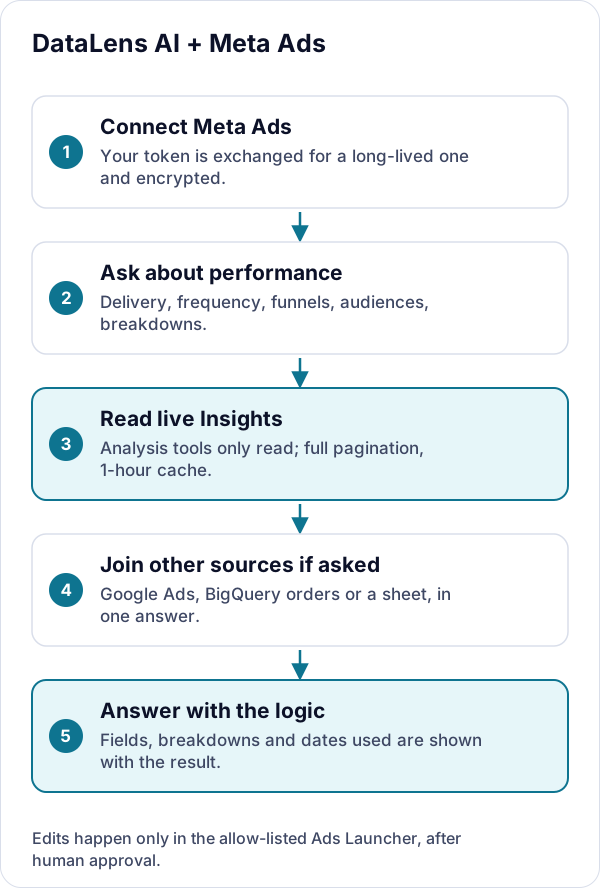
What DataLens can and cannot do
- Analysis is read-only: the tools DataLens uses to answer questions only read campaigns, ad sets, ads, audiences and Insights.
- A separate, allow-listed Ads Launcher can create or edit ads, but only after a person approves each staged change — and the approved arguments are exactly the ones executed.
- Insights responses are cached for an hour to avoid re-pulling identical reports.
More detail on credentials, encryption and model providers is on the security page.
Meta Ads integration FAQs
Can DataLens change my Meta campaigns?
Not when it is answering questions: the analysis tools only read. A separate Ads Launcher, available only to allow-listed accounts, can create or edit ads, and every write it makes must first be approved by a person who sees exactly what will change.
Which Meta data can DataLens read?
Ad accounts, campaigns, ad sets, ads, audiences and targeting, and Insights with breakdowns such as age, gender and placement — the same data you see in Ads Manager, pulled live through the Marketing API.
Why do Meta numbers differ from my store or database?
Meta credits a purchase to an ad within its attribution window — 7-day click and 1-day view by default — including people who saw but did not click. Your store counts each order once. DataLens can put both side by side so the gap is explicit.
Try it on your own data
Sign in with Google to start a 7-day free trial in your own private project — no credit card. Bring your own model key (or request managed models), connect a source, and every answer arrives with its SQL.
Last reviewed October 3, 2026.