An AI analyst for BigQuery that shows its SQL
DataLens AI connects to Google BigQuery and answers plain-English questions by writing and running SQL against your own tables. Every answer comes with the exact query, the bytes it scanned and what that cost, so anyone can check the number before it reaches a meeting.
What can you ask BigQuery?
“What was blended ROAS by week for the last eight weeks, using revenue from our orders table?”
A weekly table and chart, the SQL that joined spend to orders, and the scan cost of that query.
“Which acquisition month pays back its CAC fastest?”
A cohort payback curve built from your own orders, with the cohort definition visible in the SQL.
“How much would a full-year query on the events table scan, and how do we cut it?”
The dry-run estimate, plus where partition and cluster filters would reduce the bytes scanned.
“Which products drove most refunds last month?”
A ranked breakdown with the exact filters and refund definition used, ready to re-run with Verify.
“Compare daily revenue with the same days last year.”
A year-over-year series aligned by weekday, with the date logic spelled out in the query.
How do you connect Google BigQuery to DataLens?
- Sign in with your Google account (OAuth), or upload a Google Cloud service account key. Scheduled reports need the service account, since nobody is signed in when they run.
- For least privilege, scope the service account to BigQuery Data Viewer and BigQuery Job User. Keys are encrypted at rest (AES-256-GCM) and never sent back to the browser.
- Pick the projects and datasets DataLens may use. It reads table schemas, column types and sample distinct values so the model knows what exists before it writes a query.
- Add schema notes for business meaning — for example, "order_status = completed means paid" — so "revenue" maps to your definition, not a guess.
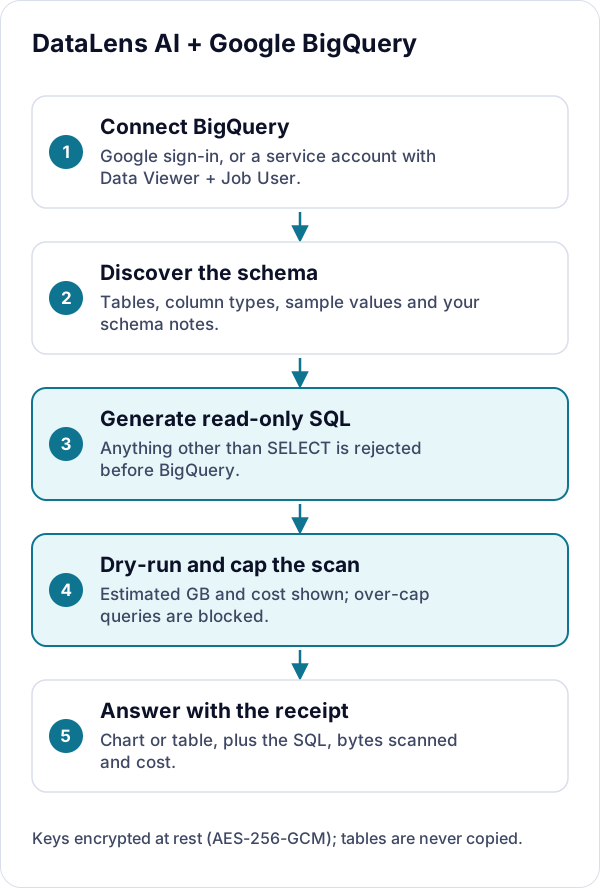
What DataLens can and cannot do
- Read-only by enforcement, not policy: any generated query that is not a plain SELECT (or WITH … SELECT) is rejected before it reaches BigQuery.
- INSERT, UPDATE, DELETE, MERGE, DROP, TRUNCATE, ALTER, CREATE, GRANT and EXECUTE IMMEDIATE are blocked outright.
- Every query is dry-run first to show the estimated bytes and cost; queries over your configured scan cap are blocked before they bill.
- No copy of your tables: queries run live. What is saved is the conversation, the SQL and up to 50 result rows per message so a past answer still renders.
More detail on credentials, encryption and model providers is on the security page.
Google BigQuery integration FAQs
Can DataLens change or delete anything in BigQuery?
No. Before a generated query reaches BigQuery, DataLens rejects anything that is not a plain SELECT or WITH … SELECT, and blocks INSERT, UPDATE, DELETE, MERGE, DROP, TRUNCATE, ALTER, CREATE, GRANT and EXECUTE IMMEDIATE. Pair that with a service account limited to Data Viewer and Job User for least privilege on your side too.
How does DataLens stop an expensive BigQuery query?
Every query is dry-run before it executes, which returns the bytes it would scan. DataLens shows that estimate and its cost, and blocks the query outright if it exceeds the scan cap you set, so a careless full-table scan never runs.
Does DataLens copy our BigQuery data?
No. There is no sync and no replica: each question runs live against your warehouse. The conversation is saved — your question, the answer, the SQL and up to 50 rows per message — and deleting the conversation removes it.
Which roles does the service account need?
BigQuery Data Viewer on the datasets you want analysed and BigQuery Job User on the project that runs the queries. Signing in with Google instead uses the broader OAuth scope BigQuery requires to start query jobs.
Try it on your own data
Sign in with Google to start a 7-day free trial in your own private project — no credit card. Bring your own model key (or request managed models), connect a source, and every answer arrives with its SQL.
Last reviewed October 3, 2026.