Ask your Google Ads account questions in plain English
DataLens AI connects to Google Ads and turns questions about campaigns, keywords, search terms and budgets into live Google Ads API queries. It reads your account and never changes it — there is no code path that edits a campaign — and each answer shows the query it ran.
What can you ask Google Ads?
“Which search terms spent money last week without converting?”
A spend-sorted search-term list with zero-conversion rows, ready for a negative-keyword review.
“Are my campaigns losing impression share to budget or to rank?”
Lost-to-budget versus lost-to-rank by campaign, which tells you whether the fix is money or bids and quality.
“Will each campaign over- or under-spend by month end at the current pace?”
Month-to-date spend, run-rate projection and the gap to budget per campaign.
“How does Google Ads ROAS compare with revenue in our own database?”
Platform-reported conversion value next to orders from BigQuery, with the attribution gap made explicit.
“What changed in this campaign the week performance dropped?”
Performance by day alongside the metrics that moved, so the cause can be narrowed before anything is edited.
How do you connect Google Ads to DataLens?
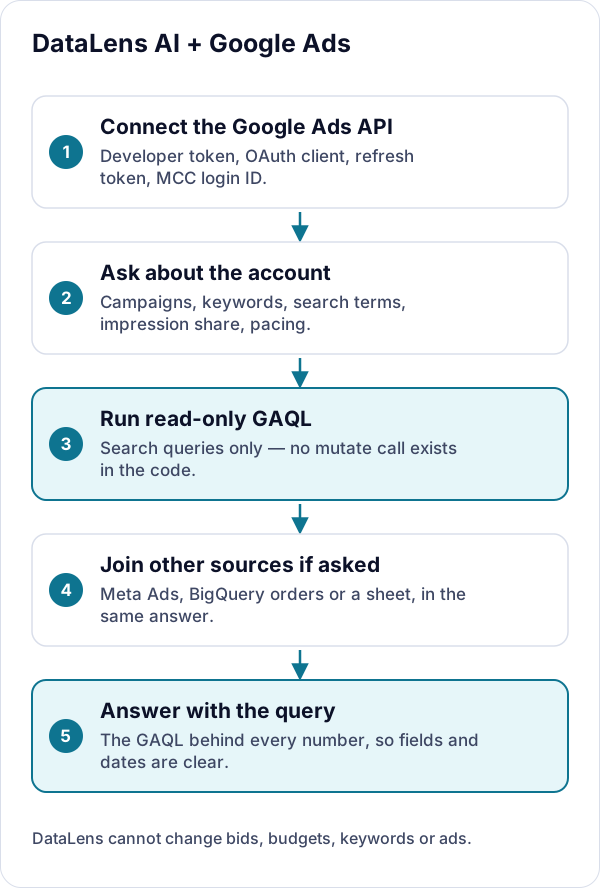
- Add your Google Ads API credentials: developer token, OAuth client ID and secret, refresh token, and — for manager (MCC) accounts — the login customer ID.
- Credentials are encrypted on the server and never returned to the browser; settings only show which account is connected.
- Ask about one account or several. Results can be joined with Meta Ads or BigQuery data in the same answer.
What DataLens can and cannot do
- Read-only: DataLens queries Google Ads with GAQL search requests only. It has no mutate calls, so it cannot change bids, budgets, keywords or ads.
- API responses are cached for an hour, so repeated questions do not re-pull the same report.
- Every answer shows the GAQL behind it, so you can see exactly which fields, segments and date range were used.
More detail on credentials, encryption and model providers is on the security page.
Google Ads integration FAQs
Can DataLens make changes to my Google Ads account?
No. The Google Ads integration only sends GAQL search queries. There is no mutate call anywhere in it, so it cannot change bids, budgets, keywords, ads or settings.
Do I need a Google Ads developer token?
Yes. DataLens connects through the Google Ads API, which requires a developer token plus an OAuth client and refresh token. Manager (MCC) accounts also need the login customer ID.
Can I combine Google Ads with Meta Ads or my database?
Yes. DataLens can fetch Google Ads and Meta Ads data and join it with BigQuery tables in one answer — for example, blended spend from both platforms against completed orders in your database.
Try it on your own data
Sign in with Google to start a 7-day free trial in your own private project — no credit card. Bring your own model key (or request managed models), connect a source, and every answer arrives with its SQL.
Last reviewed October 3, 2026.