Connect your data. Ask in plain English.
DataLens AI connects to Google BigQuery, Google Ads, Meta Ads, Google Sheets and CSV or Excel files. Questions can span several sources at once — ad spend from two platforms against orders in your warehouse, for example — and every answer shows the query that produced it. PostgreSQL, MySQL and Snowflake are on the roadmap but not connectable yet.
Google BigQuery
Ask BigQuery questions in plain English. DataLens writes read-only SQL, shows the scan cost before it runs, and puts the query behind every answer.
How it works →Google Ads
Ask Google Ads questions in plain English: campaigns, search terms, impression share, pacing. Read-only access, and the query behind every answer.
How it works →Meta Ads
Ask Meta Ads questions in plain English: delivery, frequency, funnels, breakdowns. Live Facebook and Instagram insights with the logic behind every answer.
How it works →Google Sheets, CSV & Excel
Ask questions of Google Sheets, CSV and Excel files in plain English: no credentials, no ETL. Join spreadsheets with ad and warehouse data.
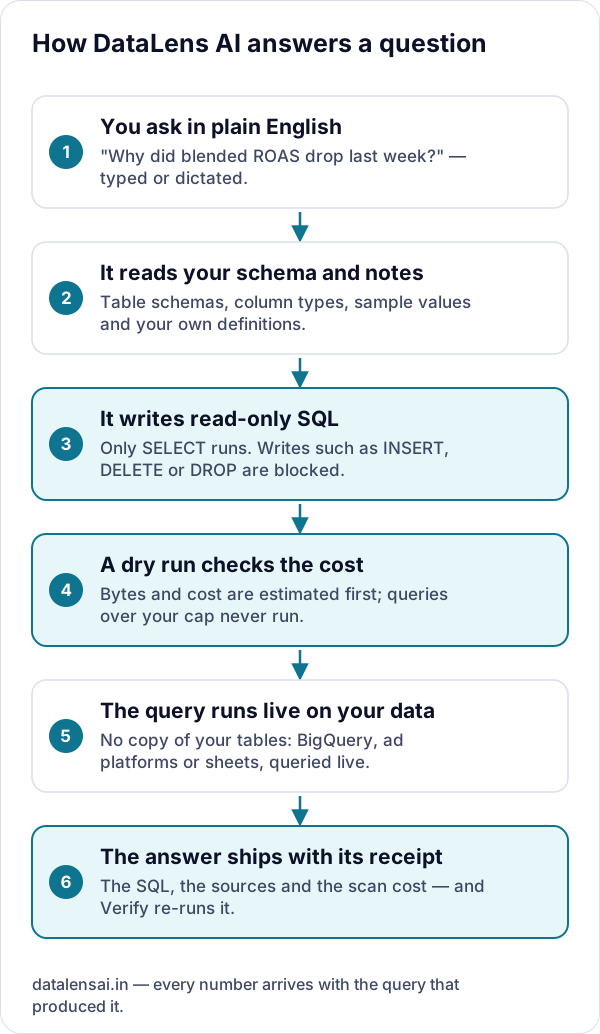
How it works →How does DataLens answer a question?
Whatever the source, the path is the same: DataLens reads the schema, writes a read-only query, checks what it will cost, runs it live, and returns the answer with the query, the sources and the cost attached.
Built for
Try it on your own data
Sign in with Google to start a 7-day free trial in your own private project — no credit card. Bring your own model key (or request managed models), connect a source, and every answer arrives with its SQL.